


Secure Sharing
A secure file-sharing platform for creative teams
Share a folder, collection, or people group with a link — recipients don't need an account, and you stay in control of who can see or add what.
Getting files out of your library and into a client's or collaborator's hands shouldn't require an email chain of oversized attachments or handing over broad access to a shared drive. PandaDAM is a secure file-sharing platform built directly into the media library: instead of exporting files and sending them somewhere else, you create a link that points at exactly what you want to share — a folder, a collection, or a people group — and control exactly how much access that link grants.
Because sharing is built into the same system as the library itself, there's nothing to export, re-upload, or keep in sync. The link always reflects the current state of whatever it's scoped to, and every option below — password, expiration, upload access — is configured per link, not as a global setting that applies to everything you ever share.
The rest of this page walks through exactly how each part of secure sharing works: the three scopes a link can point to, the optional password and expiration controls, upload-enabled links for receiving files back, and how this compares to the two most common workarounds teams reach for instead — emailing files and handing out broad shared-drive access.
Scoped share links
Links are scoped to a specific folder, collection, or people group — never your whole library.
No login required
Recipients open the link and view the shared assets directly — no account or sign-up needed.
Optional password protection
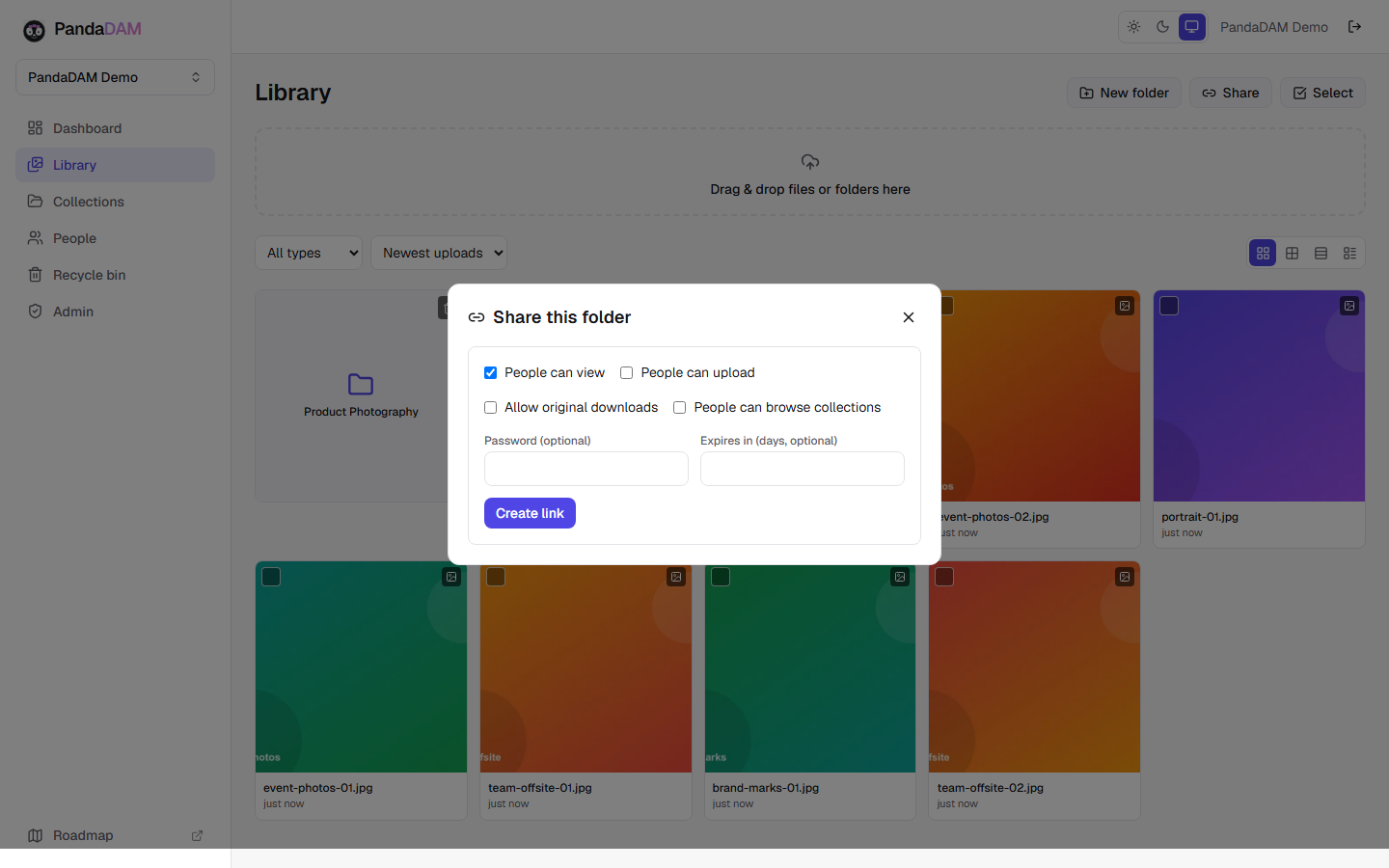
Add a password to a share link when you need an extra layer of control over who can access it.
Optional expiration
Set a link to expire automatically so access doesn't linger longer than it should.
Optional upload-enabled links
Turn on upload access for a link so clients or collaborators can drop files in without needing an account.
Three scopes for secure media file sharing: folder, collection, or people group
A share link in PandaDAM always points at one of three things. A folder share hands over everything inside that folder, which is the natural fit when a client needs a full deliverable set. A collection share hands over a curated set of assets that may be pulled from multiple folders — useful for a highlight reel or a specific selects gallery without exposing the folders those files actually live in. And a people-group share hands over every photo a specific enrolled person appears in, drawing on the same facial recognition grouping used in the People view — a natural fit for sending someone every photo they personally appear in from an event without manually collecting them first.
In every case, the link is scoped narrowly to that folder, collection, or person — never to the whole workspace. Sharing a folder doesn't expose sibling folders, and sharing a collection doesn't expose the rest of the library it was pulled from.
Password protection and expiration, set per link
Any share link can optionally require a password before it opens, which is useful when a link might be forwarded beyond its intended recipient, or when the content is sensitive enough that a bare URL isn't enough gatekeeping on its own. Expiration works alongside that: a link can be set to stop working automatically after a given date, so a proofing gallery or a temporary delivery link doesn't quietly stay live for months or years after the project it was created for has wrapped.
Neither setting is mandatory — a quick internal share can skip both — but for anything going to a client, a vendor, or anyone outside the core team, password-protected file sharing with a defined expiration date is the more deliberate default.
Upload-enabled links: a client file-sharing portal, without a separate product
Sharing usually goes one direction — you send, they view. Upload-enabled links flip that around without requiring a second tool: turn on upload access for a link, and whoever has it can drop files directly into the scoped folder without creating an account. A client can hand over raw footage, source files, or reference material the same way they'd receive a delivery — through a link, not an email attachment or a request for drive access.
This is, functionally, what most people mean when they look for a client file-sharing portal: a way for a client to send and receive project files through one link, without needing credentials of their own. PandaDAM provides that through upload-enabled share links rather than a separate branded portal product — the mechanism is the same link infrastructure used for every other kind of share, just with the upload permission switched on.
No login required — for large files, without the workarounds
Recipients never need a PandaDAM account to open a share link, view what's inside it, or (with upload enabled) add files to it. That matters most for the audiences who are least likely to want to create an account just to look at a gallery or drop off a file — a client, a vendor, a one-time collaborator, or someone on the other side of an approval chain who touches the project once.
It also solves the practical problem that pushes most teams toward emailing huge attachments or granting broad access to a shared drive in the first place: large video and photo files don't travel well as email attachments, and handing someone access to an entire shared drive to get them one folder is more access than the situation calls for. A scoped share link gets around both — no file-size wrestling with an inbox, and no broader access than what was actually asked for.
Who controls a share link once it's sent
A share link isn't a one-time export that lives on independently once it's sent — it stays tied to the folder, collection, or people group it points to, and to the workspace it was created from. That means the person who created it can revoke access, change its password, or adjust its expiration after the fact, rather than being stuck with whatever settings were chosen at the moment of sharing. If a project scope changes, or a link needs to be shut off earlier than planned, that's a setting change, not a request to a client to delete an email or stop using a downloaded file.
That level of ongoing control is one of the clearest practical differences between a share link and an emailed attachment. Once a file leaves an inbox as an attachment, there's no way to revoke it — it exists wherever it was downloaded to, indefinitely. A share link stays governed by the workspace it came from for as long as it's active.
Sharing a people group: a use case unique to PandaDAM's library
Because PandaDAM's facial recognition groups photos by person, sharing isn't limited to the usual folder-and-collection scopes — a link can also be scoped to everything a specific enrolled person appears in. That's a genuinely different kind of share: instead of curating a gallery by hand for someone who wants every photo they're personally in from an event or a project, the grouping is already done, and the share link simply points at it.
This only works for workspaces that have facial recognition enabled and the relevant person already enrolled — it's an extension of that feature, not a separate capability. Where it applies, though, it removes a step that would otherwise require manually collecting every relevant photo into a collection before it could be shared at all.
Large file-sharing software without the file-size ceiling
Most email providers cap attachment sizes well below what a single high-resolution photo set or a short video export actually weighs, which is exactly why so many teams end up improvising — compressing files until quality suffers, splitting a delivery into multiple emails, or relying on a separate transfer tool just for the one file that's too big. A share link avoids that ceiling entirely, because the recipient is opening or downloading directly from cloud storage rather than receiving the file as an email payload. A full-resolution video export or a large batch of RAW photos moves through the same link as a handful of small images.
That also means there's nothing to compress or resize before sending. What's in the shared folder or collection is exactly what the recipient gets, at full quality, whether it's a single file or several hundred.
Sharing works the same way for every asset type
A share link doesn't care whether the folder or collection it points to holds photos, video, or a mix of both — the same scoping, password, expiration, and upload options apply regardless of file type. That consistency matters in practice: a project folder that contains a hero video, supporting photography, and raw exports can be shared as a single link, rather than needing one sharing method for images and a different one for video.
It also means the recipient's experience doesn't change based on what they're looking at. They open the same link, see the same interface, and view photos in the built-in photo viewer or play video in the built-in player — all without leaving the page the link took them to.
Deciding when to add a password or an expiration date
Not every share needs the same level of caution, so both settings are optional rather than forced. A quick internal share between two people already inside the workspace might not need either. A delivery going to a client outside the organization is usually a better fit for both — a password so the link isn't useful to anyone it gets forwarded to by accident, and an expiration date so access naturally winds down once the project is delivered instead of quietly staying live indefinitely. Upload-enabled links aimed at collecting files from an external contractor or vendor are a similarly good fit for a password, since they grant write access rather than just view access.
Because these are per-link settings rather than a single account-wide policy, a workspace can use a lighter touch for internal collaboration and a more deliberate one for anything crossing outside the organization, without having to choose one policy for every share it ever creates.
Sharing as part of the same workspace, not a separate system
Because share links are generated from inside a workspace rather than through a separate delivery tool, creating one is just another action taken on a folder, collection, or people group you already have access to — not a trip to a different application or a different login. That keeps sharing tied to the same library, the same roles, and the same isolated workspace storage as everything else, rather than becoming a side channel that operates under its own separate rules.
Frequently asked questions
Does a recipient need a PandaDAM account to view a share link?
No. Anyone with the link can view the shared folder, collection, or people group without creating an account or signing in.
Can I let a client upload files back without giving them a login?
Yes. Turning on upload access for a share link lets recipients drop files directly into the scoped folder without an account.
Can I share just the photos a specific person appears in?
Yes, using a people-group share link, which draws on the same facial recognition grouping used in the People view.
Can a share link expire automatically?
Yes. An expiration date is optional per link, so access can be set to stop automatically after a given date.
Does sharing a folder expose the rest of my library?
No. A share link is scoped to exactly the folder, collection, or people group it was created for — never the full workspace.
Can I revoke a link after I've already sent it?
Yes. A share link stays tied to your workspace, so its password, expiration, or access can be changed or revoked after the fact — unlike an email attachment, which can't be pulled back once it's downloaded.
Is there a file size limit on what I can share?
Share links point at files in cloud storage rather than attaching them to an email, so they avoid the size ceilings typical of email attachments — a large video export or a big batch of photos shares the same way a handful of small files would.
See the rest of the platform
Secure sharing works with every asset in your library, including video and 360° media.