Video & 360° Assets
Video asset management software without leaving the browser
Play, review, and organize video alongside your photos — with automatic metadata extraction and thumbnail generation on every upload.
Video files tend to break simple file-storage habits faster than photos do. They're larger, harder to preview at a glance, and often end up parked in a separate drive or downloads folder just because nobody wants to wait for a download to see what's in them. PandaDAM's video asset management software is built to remove that friction: video plays directly in the browser, sits in the exact same folders, collections, and search index as every other asset type, and gets the same automatic metadata extraction and thumbnail generation that photos get on upload.
The result is a video library software experience that doesn't feel like a separate system bolted onto a photo tool — it's the same library, the same search, and the same sharing links, just with video files included instead of quietly excluded.
Below is a closer look at how video actually behaves inside PandaDAM — playback, metadata, organization, and sharing — along with an honest account of where 360° video stands today versus what's still being built.
Built-in video player
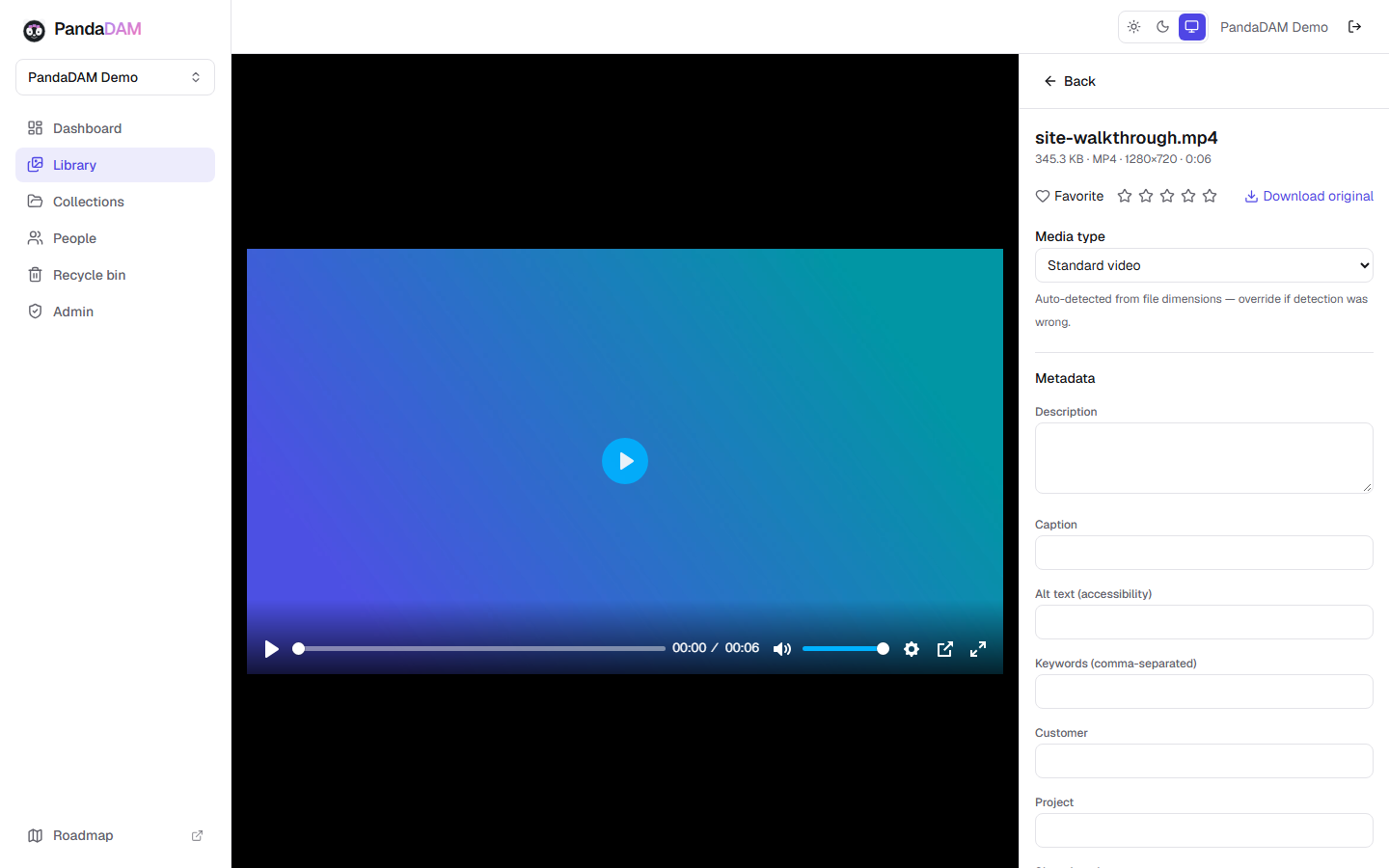
Standard playback controls — play, pause, scrub, volume, and fullscreen — so you can review footage without downloading it first.
Automatic metadata extraction
EXIF and file metadata are pulled automatically on upload, so technical details are captured without manual entry.
Thumbnail and preview generation
Thumbnails and previews are generated automatically, so your library stays visual even with large video files.
360° photo and video support
Upload 360° photos and video alongside standard media. Today, PandaDAM displays the flat source file — a fully interactive panoramic viewer is on the roadmap.
Want the interactive 360° viewing experience? It's on our roadmap.
A cloud video asset management system, not a bolt-on player
A lot of tools treat video as an afterthought: photos get a full library experience, and video gets a download link. PandaDAM treats video as a first-class asset type. It lives in the same folder structure as your photos, can belong to the same collections, shows up in the same search results, and can be shared through the same scoped links. There's no separate video module to learn or a different permission model to keep straight — it's one digital video management system covering every file type a team actually works with.
That matters most for teams whose work genuinely mixes media types — a shoot that produces stills and behind-the-scenes clips, a marketing project that needs a hero video and a dozen supporting images, or a client folder that should contain everything related to a project regardless of format. Keeping video inside the same cloud-based library means nobody has to remember which system holds which file type.
Playback that doesn't require a download
The built-in video player supports the controls people expect from any modern player: play, pause, scrubbing through the timeline, volume control, and fullscreen. Because playback happens directly in the browser, reviewing a clip doesn't require downloading a large file first, waiting for a separate media player to open it, or worrying about which codec is installed on a reviewer's machine. Anyone with access to the asset — or a share link pointing to it — can open it and watch it immediately.
This is especially useful during review cycles, when several people need to look at the same clip in sequence. Instead of passing a file around or re-uploading it to a separate review tool, everyone opens the same asset inside the library and watches it the same way.
Automatic metadata and thumbnails on every upload
When a video is uploaded, PandaDAM automatically extracts its available metadata and generates a thumbnail and preview — the same behavior that applies to photos. Nobody has to manually create a thumbnail, note down a resolution, or fill in a capture date by hand just so the file looks right in grid view. That automatic step is what keeps a growing video library visual and scannable instead of turning into a list of generic file icons and cryptic filenames.
On top of the automatic fields, the same manual metadata available for photos — description, caption, alt text, keywords, customer, and project — can be filled in for video assets too, and all of it is searchable. A video tagged with the right client name and project keyword is just as findable months later as a photo would be.
Video sits inside the same search, filters, and sharing as photos
Because video isn't a separate system, it benefits from everything already built for the media library: folder and collection organization, filtering by file type when you want to isolate video specifically, favorites and ratings for surfacing the best takes, bulk actions for cleaning up a folder of raw footage, and SHA-256 duplicate detection so re-importing the same export doesn't silently double your storage. Deleting a video — like deleting anything else in PandaDAM — sends it to the recycle bin first, not straight to permanent removal.
Sharing works the same way too. A share link can be scoped to a folder or collection containing video, with the same optional password protection, expiration date, and upload-enabled mode available for photo shares. A client reviewing a rough cut doesn't need an account — they open the link and watch it.
360° video today, and what's coming next
360° video files are supported as a first-class asset type in PandaDAM right now — you can upload them, organize them, search for them, and share them exactly like any other video. What's not built yet is an interactive panoramic viewer: today, a 360° video displays as its flat, equirectangular source file rather than an explorable, draggable panorama. An interactive viewer for 360° media is in active development and tracked on our roadmap. We'd rather be precise about that distinction now than let anyone assume the interactive experience already exists.
Reviewing footage as a team without a separate review tool
Video review usually pulls in more than one person — a producer checking a rough cut, a client signing off on a final edit, a team lead comparing two takes before choosing one. Because playback happens inside the same library everyone already has access to, review doesn't require passing a file around or standing up a separate review tool just for that one project. Anyone with access to the workspace, or a share link scoped to the right folder, opens the same asset and watches the same file — not a re-compressed preview or a lower-resolution stand-in.
That consistency matters when feedback depends on actually seeing detail — color, framing, motion — rather than a rough approximation of the final file. Because the player streams the source asset directly, what a reviewer sees in the browser is the same file that ends up delivered, not a separate proxy that might hide an issue until the real export goes out.
Organizing raw footage, cuts, and deliverables together
A single video project usually produces more than one kind of file — raw footage straight off a camera, intermediate cuts, and a final deliverable — and PandaDAM doesn't force those into separate systems. All of them can live in the same project folder, distinguished by filename, description, or keywords rather than by which tool they happen to be stored in. A collection can then pull just the final deliverables across several projects into one place, for a portfolio reel or a client recap, without moving the raw footage those cuts were built from.
Favorites and star ratings work on video the same way they do on photos, which is useful for marking a preferred take out of several similar clips, or flagging the version that's actually approved for delivery among a folder of drafts. None of that requires a separate versioning system — it's the same lightweight marking tools used across the rest of the library, applied to video.
Cloud storage built to handle large video files
Video files are typically far larger than photos, and PandaDAM's storage is built around cloud object storage designed for exactly that — Amazon S3, Wasabi, or DigitalOcean Spaces, selected when a workspace is created, accessed over an encrypted connection. That means a growing library of raw footage and finished exports doesn't run into the practical limits of a local drive or a laptop's available space; the storage scales with the workspace rather than with any one device.
Enterprise customers who need to host media under infrastructure that already meets specific requirements can connect their own cloud storage account instead of using PandaDAM's default providers, while keeping the same library, playback, and sharing experience on top of it.
A digital video management system that fits existing team roles
Video work often involves a different mix of people than photo work does — an editor cutting footage, a producer approving a rough cut, a client signing off before publication. PandaDAM's five roles — Admin, Manager, Contributor, Viewer, and Client — apply to video the same way they do to any other asset, so an editor can be given Contributor access to upload and organize footage while a client reviewing a delivery gets Client-level access scoped to just what's been shared with them. Nobody needs a separate permission system just because the asset type changed from photo to video.
That consistency also applies to deletion. A video moved to the recycle bin behaves exactly like a photo would — recoverable until someone takes the separate, explicit step of permanently deleting it from inside the recycle bin — so an accidentally deleted export isn't a heavier loss just because the file happened to be large.
Frequently asked questions
Do I need to download a video to review it?
No. Video plays directly in the browser through the built-in player, with standard controls including scrubbing, volume, and fullscreen.
Does duplicate detection work on video files?
Yes. SHA-256 duplicate detection applies to every upload regardless of file type, including video, so re-importing the same export doesn't create a second copy.
Can I share video the same way I share photos?
Yes. Share links can be scoped to a folder or collection containing video, with the same optional password, expiration date, and upload-enabled mode available for any other asset type.
Can I view 360° video as an interactive panorama today?
Not yet. 360° video is supported as an asset type and displays as its flat source file today. An interactive panoramic viewer is in active development and listed on the roadmap.
Is video metadata extracted automatically?
Yes. Metadata and a thumbnail/preview are generated automatically for every video on upload, the same way they are for photos.
Can I keep raw footage and finished cuts in the same project folder?
Yes. There's no requirement to separate raw footage from intermediate cuts or final deliverables — they can all live in the same folder, distinguished by filename, description, or keywords, or pulled into a collection when you need just the finished pieces.
Does a large video library run into storage limits on our end?
No. Media is stored in cloud object storage — Amazon S3, Wasabi, or DigitalOcean Spaces — so a growing library of raw and finished video scales with the workspace rather than any one device's local storage.
Can I mark a preferred take among several similar clips?
Yes. Favorites and star ratings work on video the same way they do on photos, so a preferred take or an approved cut can be flagged without a separate versioning system.
Can I control who has access to a video, the way I would with photos?
Yes. The same five roles — Admin, Manager, Contributor, Viewer, and Client — apply to video assets, and video deleted by any role goes to the recycle bin first, exactly like any other file type.
Does the video player support fullscreen playback?
Yes. Standard controls include play, pause, scrubbing, volume, and fullscreen, all available directly in the browser without downloading the file first.
Can I tag video with a client or project name like I can with photos?
Yes. Description, caption, alt text, keywords, customer, and project are all available on video assets, all searchable, in addition to the metadata extracted automatically on upload.
Can video be organized into the same collections as photos?
Yes. A collection can mix video and photos pulled from different folders — for example, a project recap made up of a hero video and supporting stills — without moving either out of its original folder.
See how video fits into your library
Video and 360° assets live alongside every other file type in the same organized library.